查詢特定的port占用:
netstat -o -n -a | findstr 0.0:80
找到最後面的pid,開啟工作管理員的[詳細資料],找到對應的pid
2014年10月5日 星期日

2014年9月22日 星期一
Joomla 與 Xampp 後台教學
1.觀看頁面的整體位置:
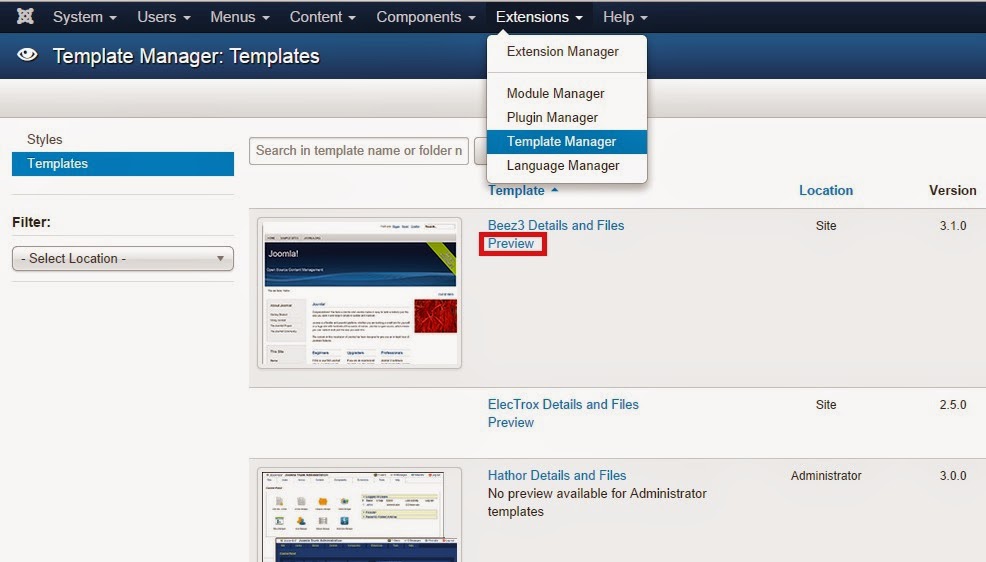


2.Module - 側欄
Extension -中間主頁
3.joomla的SQL帳號與密碼設定檔:
C:\xampp\htdocs\Joomla -> configuration.php -> public $password = '1234';
phpMyAdmin網頁登入1045錯誤處理 將auth_type改為cookie:
C:\xampp\phpMyAdmin -> config.inc.php -> $cfg['Servers'][$i]['auth_type'] = 'cookie';
4.密碼的使用:
A兩處的密碼皆使用同一個mysql密碼
A-1. C:\xampp\htdocs\Joomla ->
configuration.php -> public $password = '1234';
A-2. http://localhost/phpmyadmin
B.此密碼為創建網站就使用的root/密碼
http://localhost/joomla/administrator/index.php
5.修改http://localhost/phpmyadmin 密碼只能藉由 登入後台修改

6.修改http://localhost/joomla/administrator/密碼的方式:
貼入d2064d358136996bd22421584a7cb33e:trd7TvKHx6dMeoMmBVxYmg0vuXEA4199 (代表明密碼:secret)
重新由http://localhost/joomla/administrator/ 登入root/secret
再到edit account
給root編輯新的密碼
7.xampp 的phpMyAdmin 在資料庫管理中,點選 結構 導致 錯誤(載入)holding 處理:
將主頁的語系設定為 英文
2014年9月17日 星期三
Android 指令
列出所有package:adb shell pm list packages <app名稱>
指定package作隨機測試:adb shell monkey -p com.example.musictest -v 300
查出android api level : android list target
指定package作隨機測試:adb shell monkey -p com.example.musictest -v 300
查出android api level : android list target
Visual Studio
熱鍵:
下一個游標點:ctrl + -
上一個游標點:ctrl + shift + -
C++ - Window Form:
Message Alert:
MessageBox::Show("USA army","My policy", MessageBoxButtons::OKCancel,
下一個游標點:ctrl + -
上一個游標點:ctrl + shift + -
C++ - Window Form:
Message Alert:
MessageBox::Show("USA army","My policy", MessageBoxButtons::OKCancel,
MessageBoxIcon::Asterisk);
2014年9月11日 星期四
Linux 基本知識
1.tarball 即是 tar.gz壓縮的意思 , carrier 溢位
Alias-別名 : 可使用於將 A.長指令CMD轉成短代號 或 B.將網頁的子目錄對應到 網址的別名上
2.RPM安裝平台-
所有Intel x86指令集的處理器,Pentium 3 ,Pentium 4,AMD的K7 : i386平台
Intel的Pentium 3 ,Pentium 4,pentium M, 與 AMD的Athlon,Duron,Thunderbird 以上等級:i686平 台
Intel x86 處理器平台的Pentium MMX, AMD的K5, K6: i586平台
Intel 64位元 Xeon, AMD K8, Athlon64 等 64位元等級的處理器:x86_64平台
不限定任何平台,通用各類平台的RPM套件軟體: noarch
3.RPM- Redhat Package Manager :套件軟體標準
YUM:套件檔案的版本與相依性資料庫,相依的附加套件一併打包下載回來,且自動安裝完成
4.loopback interface(簡稱lo):回路介面
5.私人IP位址:
class A: 10.0.0.0 ~ 10.255.255.255
class B: 172.16.0.0 ~ 172.31.255.255
class C: 192.168.0.0 ~ 192.168.255.255
6.class A~ class E的遮罩:0XXXXXXX,10XXXXXX,110XXXXX,1110XXXX,11110XXX
7.Linux的服務即稱為Daemon ,所以網頁服務稱為httpd ,telnetd(以d為結尾)
8.服務執行檔目錄:/etc/init.d/
其他/etc/rcX.d/ ; 開機自動執行的shell script:/etc/rc.d/rc.local
9.啟動層級服務腳本目錄:ls -dl /etc/rc*
10.開機自動執行的腳本檔(可於最後列編輯):/etc/rc.local
11.Standalone 獨立型服務-開機後會不停止服務
xinetd 總管服務-有需要才會進行服務
12.系統排程: cat /etc/crontab
排程運作紀錄:/var/log/cron
13. Linux安全防護機制:
iptables - 防火牆:對於進來的連線服務要穿透linux的外層時,所要過濾port號 與 封包
Security Enhanced Linux-SELinux - 增強安全機制
14.vsftpd 安全性ftp-
匿名登入-/var/ftp/
使用者帳號登入- /帳號家目錄
17.FQDN(Fully Qualified Domain Name)-網域名稱
Alias-別名 : 可使用於將 A.長指令CMD轉成短代號 或 B.將網頁的子目錄對應到 網址的別名上
2.RPM安裝平台-
所有Intel x86指令集的處理器,Pentium 3 ,Pentium 4,AMD的K7 : i386平台
Intel的Pentium 3 ,Pentium 4,pentium M, 與 AMD的Athlon,Duron,Thunderbird 以上等級:i686平 台
Intel x86 處理器平台的Pentium MMX, AMD的K5, K6: i586平台
Intel 64位元 Xeon, AMD K8, Athlon64 等 64位元等級的處理器:x86_64平台
不限定任何平台,通用各類平台的RPM套件軟體: noarch
3.RPM- Redhat Package Manager :套件軟體標準
YUM:套件檔案的版本與相依性資料庫,相依的附加套件一併打包下載回來,且自動安裝完成
4.loopback interface(簡稱lo):回路介面
5.私人IP位址:
class A: 10.0.0.0 ~ 10.255.255.255
class B: 172.16.0.0 ~ 172.31.255.255
class C: 192.168.0.0 ~ 192.168.255.255
6.class A~ class E的遮罩:0XXXXXXX,10XXXXXX,110XXXXX,1110XXXX,11110XXX
7.Linux的服務即稱為Daemon ,所以網頁服務稱為httpd ,telnetd(以d為結尾)
8.服務執行檔目錄:/etc/init.d/
其他/etc/rcX.d/ ; 開機自動執行的shell script:/etc/rc.d/rc.local
9.啟動層級服務腳本目錄:ls -dl /etc/rc*
10.開機自動執行的腳本檔(可於最後列編輯):/etc/rc.local
11.Standalone 獨立型服務-開機後會不停止服務
xinetd 總管服務-有需要才會進行服務
12.系統排程: cat /etc/crontab
排程運作紀錄:/var/log/cron
13. Linux安全防護機制:
iptables - 防火牆:對於進來的連線服務要穿透linux的外層時,所要過濾port號 與 封包
Security Enhanced Linux-SELinux - 增強安全機制
14.vsftpd 安全性ftp-
匿名登入-/var/ftp/
使用者帳號登入- /帳號家目錄
15.DNS設定檔- /etc/resolv.conf
16.DNS伺服器架設軟體-BIND(Berkeley Internet Name Domain)
Port-53, use TCP/UDP,need Firewall opened
17.FQDN(Fully Qualified Domain Name)-網域名稱
2014年9月4日 星期四
Linux basic command
搜尋文件裡面的關鍵字:
grep -rnw '/home/xx/xx/software/curl-7.56.1' -e 'curl_easy_perform'
unzip file to another folder:
tar xzf archive.tar.gz -C /destination
change User:
su - knight
check self:
whoami
show command content by page:
ls -al | more
show command content by page in second way:
ll | more
find executable file or command :
which ifconfig
system info:
dmesg | more
find specified file:
find /home -name(-size,-perm,-newer,-ctime)
search some word in file:
grep go install.log
search some word in command:
ls -al | grep word1
find path word:
echo $PATH
append word in exist file:
ls /bin >> file
modified or create file:
touch file1
remove directory forcely:
rm -rf folder1
add write permission for user:
chmod u+w john
Check disk space:
df
check folder space:
du -h
du -sh(total)
process check :
ps aux | more
process tree:
pstree
stop process:
ctrl + z
put process into background 1:
sleep 40 &
put process into background 2:
sleep 50 (ctrl + z)
bg
ps -f
put background/foreground for process:
bg/fg [number]
check bg jobs:
jobs
terminated process:
ps
kill [pid]
kill process :
ps
kill -9 [pid]
kill all process:
killall httpd
ps aux | grep httpd
process priority value:
nice -n -15 sleep 200 &
ps -l
use tree check folder:
tree /proc | more
write info to file directly:
echo "newmsg" > /home/file1
watch process dynamically:
top
tar file in normally:
tar -czvf file1.tar.gz file1
un-tar file in normally:
tar -xzvf file1.tar.gz
tar file with date value:
tar -czvf back-`date +%Y%m%d`.tar.gz file1
fix time to os with network world rule:
ntpdate watch.stdtime.gov.tw
fix time to bios hardware with network world rule:
hwclock -w(hwclock -r)
show rpm installed-softwares:
rpm -qa
install gcc(conveniently way):
yum install gcc
install gcc(conveniently way with direct):
yum -y install ncurses-devel
make specified-size file for testing:
dd if=/dev/zero of=file1 bs=1M count=3
if:use /dev/zero's output zero string
of:file name
bs:every block's size
count:how many block
count file's info:
wc file1.log
11 22 33 file1.log
11 is row count
22 is character count
33 is byte count
ssh connect another linux pc:
ssh root@10.1.1.1
cross another linux to copy(local to remote):
scp file1 root@10.1.1.1:/home/john
cross another linux to copy(remote to local):
scp root@10.1.1.1:/home/john/file1 .(. is now folder)
serial number generator (use in shell script's loop tasks) :
seq 2 17 ,seq (-w) 1 2 13
sort file context by line :
sort file1(english file) , sort -g file2(number file)
remove repeat-line file by line:
uniq doc1
sort & uniq file:
sort f1 | uniq
get column value in records:
raw file-
rex,14,333
gary,53,999
yard,64,022
cut -d',' -f 2 file1
split file:
dd if=/dev/zero of=file1 bs=2M count=3
split -b 1m file1
join file:
cat xaa xab xac > file1
check 2 files are different or not:
diff file1 file2
network basic command:
ping -c 3 tw.yahoo.com
traceroute tw.yahoo.com
hostname
netstat –tnl (-n:port ,-t:tcp ,-u:udp, -l:info ,-p:pid and name)
use simple word cmd to replace long word cmd(alias):
alias dv='du -sh /var'
remove alias:
unalias dv
add alias to fixed setting file for exist alias in reboot:
cat ~/.bashrc
echo variable to show:
echo "$PATH"
echo three line word:
echo -e "line1\nline2\nline3"
set variable and get variable:
set: what=”now”
get: echo $ what
detect previous command success or not:
ls
echo $?
Result: if success ,it is 0; if fail ,it is over 0.
File test(1 is false,0 is true):
-d(folder) ,-e(exist?),-s(size is 0?),-r(read?),-w(write?)
-x(execute?),-L(link?),-n(length over 0?),-z(string is empty?)
A.test –d file1
echo $?
B.w1=”123”
w2=”ggh”
test $w1 == $w2
echo $?
Two value comparison(1 is false,0 is true):
v1=13
v2=16
test $v1 –eq(equal) $v2
-ne(different)
-ge(great or euqlal)
-gt(great)
-le(least or equal)
-lt(least)
echo $?
Check .bashrc content:
cd /root
ls –a .bas*
make a shell script and running it:
vi file1
n1=$1
n2=$2
test $n1 -gt $n2
chmod u+x file1
./file1 11 15
echo $?
If judgement:
if test $v1 –gt $v2
then
echo “bigger”
else
echo “smaller”
fi
For judgement:
for n in ‘seq 1 10’
do
echo $n
done
check Loopback network equipment :
ifconfig eth0
start/stop network card:
ifconfig eth0 up/down
configure network’s ip and netmask:
ifconfig eth0 192.168.1.2 netmask 255.255.255.0
show equipment info:
ip address show , ip link show
equipment Statistics info:
ip –s link show eth0
assign ip to specific equipment:
ip address add 10.2.3.1/24 brd + dev eth0
check assign ip to specific equipment:
ip address show dev eth0
delete ip to specific equipment:
ip address del 10.2.3.1/24 dev eth0
change equipment attribute:
ip link set eth0 up/down
find a specific ps:
ps aux | grep httpd
check system service start or not:
apt-get install chkconfig
chkconfig –list apache2 (--list:boot runlevel show)
system service start or stop:
chkconfig –level 35 httpd on/off
start/stop standalone service:
a.service [httpd/apache2] start
b./etc/init.d/[httpd/apache2] start
add new crontab task:
vi /etc/crontab (add in last line)
0 23 * * 4 root /usr/sbin/backup.sh
service crond restart
add alias to web url path:
echo “Alias /data /opt/docs” >> /etc/httpd/conf/httpd.conf
service httpd restart
限制無法存取其他目錄:
vi /etc/vsftpd/vsftpd.conf
最後加入tcp_wrappers=YES
加入禁錮名單:
echo "edw" >> /etc/vsftpd/user_list
look ip for dns:
dig [@143.25.53.12] www.kimo.com.tw
(@ip is DNS Server)
Look ip for server name:
host www.kimo.om
host www.kimo.com 41.12.124.6
host –t ns you.tube
start DNS server(after installing bind software):
service named start
(or /etc/init.d/named start)
start DNS server(after booting),better to close firewall and SELinux:
chkconfig –level 35 named on
DNS內部查詢:
dig @127.0.0.1 www.websome.com
DNS 外部查詢:
dig @192.168.1.13 www.websome.com
正常DNS 外部查詢:
dig www.websome.com
grep -rnw '/home/xx/xx/software/curl-7.56.1' -e 'curl_easy_perform'
unzip file to another folder:
tar xzf archive.tar.gz -C /destination
change User:
su - knight
check self:
whoami
show command content by page:
ls -al | more
show command content by page in second way:
ll | more
find executable file or command :
which ifconfig
system info:
dmesg | more
find specified file:
find /home -name(-size,-perm,-newer,-ctime)
search some word in file:
grep go install.log
search some word in command:
ls -al | grep word1
find path word:
echo $PATH
append word in exist file:
ls /bin >> file
modified or create file:
touch file1
remove directory forcely:
rm -rf folder1
add write permission for user:
chmod u+w john
Check disk space:
df
check folder space:
du -h
du -sh(total)
process check :
ps aux | more
process tree:
pstree
stop process:
ctrl + z
put process into background 1:
sleep 40 &
put process into background 2:
sleep 50 (ctrl + z)
bg
ps -f
put background/foreground for process:
bg/fg [number]
check bg jobs:
jobs
terminated process:
ps
kill [pid]
kill process :
ps
kill -9 [pid]
kill all process:
killall httpd
ps aux | grep httpd
process priority value:
nice -n -15 sleep 200 &
ps -l
use tree check folder:
tree /proc | more
write info to file directly:
echo "newmsg" > /home/file1
watch process dynamically:
top
tar file in normally:
tar -czvf file1.tar.gz file1
un-tar file in normally:
tar -xzvf file1.tar.gz
tar file with date value:
tar -czvf back-`date +%Y%m%d`.tar.gz file1
fix time to os with network world rule:
ntpdate watch.stdtime.gov.tw
fix time to bios hardware with network world rule:
hwclock -w(hwclock -r)
show rpm installed-softwares:
rpm -qa
install gcc(conveniently way):
yum install gcc
install gcc(conveniently way with direct):
yum -y install ncurses-devel
make specified-size file for testing:
dd if=/dev/zero of=file1 bs=1M count=3
if:use /dev/zero's output zero string
of:file name
bs:every block's size
count:how many block
count file's info:
wc file1.log
11 22 33 file1.log
11 is row count
22 is character count
33 is byte count
ssh connect another linux pc:
ssh root@10.1.1.1
cross another linux to copy(local to remote):
scp file1 root@10.1.1.1:/home/john
cross another linux to copy(remote to local):
scp root@10.1.1.1:/home/john/file1 .(. is now folder)
serial number generator (use in shell script's loop tasks) :
seq 2 17 ,seq (-w) 1 2 13
sort file context by line :
sort file1(english file) , sort -g file2(number file)
remove repeat-line file by line:
uniq doc1
sort & uniq file:
sort f1 | uniq
get column value in records:
raw file-
rex,14,333
gary,53,999
yard,64,022
cut -d',' -f 2 file1
split file:
dd if=/dev/zero of=file1 bs=2M count=3
split -b 1m file1
join file:
cat xaa xab xac > file1
check 2 files are different or not:
diff file1 file2
network basic command:
ping -c 3 tw.yahoo.com
traceroute tw.yahoo.com
hostname
netstat –tnl (-n:port ,-t:tcp ,-u:udp, -l:info ,-p:pid and name)
use simple word cmd to replace long word cmd(alias):
alias dv='du -sh /var'
remove alias:
unalias dv
add alias to fixed setting file for exist alias in reboot:
cat ~/.bashrc
echo variable to show:
echo "$PATH"
echo three line word:
echo -e "line1\nline2\nline3"
set variable and get variable:
set: what=”now”
get: echo $ what
detect previous command success or not:
ls
echo $?
Result: if success ,it is 0; if fail ,it is over 0.
File test(1 is false,0 is true):
-d(folder) ,-e(exist?),-s(size is 0?),-r(read?),-w(write?)
-x(execute?),-L(link?),-n(length over 0?),-z(string is empty?)
A.test –d file1
echo $?
B.w1=”123”
w2=”ggh”
test $w1 == $w2
echo $?
Two value comparison(1 is false,0 is true):
v1=13
v2=16
test $v1 –eq(equal) $v2
-ne(different)
-ge(great or euqlal)
-gt(great)
-le(least or equal)
-lt(least)
echo $?
Check .bashrc content:
cd /root
ls –a .bas*
make a shell script and running it:
vi file1
n1=$1
n2=$2
test $n1 -gt $n2
chmod u+x file1
./file1 11 15
echo $?
If judgement:
if test $v1 –gt $v2
then
echo “bigger”
else
echo “smaller”
fi
For judgement:
for n in ‘seq 1 10’
do
echo $n
done
check Loopback network equipment :
ifconfig eth0
start/stop network card:
ifconfig eth0 up/down
configure network’s ip and netmask:
ifconfig eth0 192.168.1.2 netmask 255.255.255.0
show equipment info:
ip address show , ip link show
equipment Statistics info:
ip –s link show eth0
assign ip to specific equipment:
ip address add 10.2.3.1/24 brd + dev eth0
check assign ip to specific equipment:
ip address show dev eth0
delete ip to specific equipment:
ip address del 10.2.3.1/24 dev eth0
change equipment attribute:
ip link set eth0 up/down
find a specific ps:
ps aux | grep httpd
check system service start or not:
apt-get install chkconfig
chkconfig –list apache2 (--list:boot runlevel show)
system service start or stop:
chkconfig –level 35 httpd on/off
start/stop standalone service:
a.service [httpd/apache2] start
b./etc/init.d/[httpd/apache2] start
add new crontab task:
vi /etc/crontab (add in last line)
0 23 * * 4 root /usr/sbin/backup.sh
service crond restart
add alias to web url path:
echo “Alias /data /opt/docs” >> /etc/httpd/conf/httpd.conf
service httpd restart
限制無法存取其他目錄:
vi /etc/vsftpd/vsftpd.conf
最後加入tcp_wrappers=YES
加入禁錮名單:
echo "edw" >> /etc/vsftpd/user_list
look ip for dns:
dig [@143.25.53.12] www.kimo.com.tw
(@ip is DNS Server)
Look ip for server name:
host www.kimo.om
host www.kimo.com 41.12.124.6
host –t ns you.tube
start DNS server(after installing bind software):
service named start
(or /etc/init.d/named start)
start DNS server(after booting),better to close firewall and SELinux:
chkconfig –level 35 named on
DNS內部查詢:
dig @127.0.0.1 www.websome.com
DNS 外部查詢:
dig @192.168.1.13 www.websome.com
正常DNS 外部查詢:
dig www.websome.com
訂閱:
文章 (Atom)